
Form 1099-NEC: Nonemployee Compensation
Upload your 1099-NEC, and Simplicity AI fills in payee names, addresses, TINs, and compensation amounts across every copy. Whether you're filing for 1 contractor or 50, stop retyping the same data into the same boxes.

AI converts your 1099-NEC into a smart, interactive form. No squinting at tiny boxes or misaligning text on the PDF.
Upload a completed W-9 as your source document, and AI pulls the contractor's details straight into the 1099-NEC.
Filing for multiple contractors? Auto-fill each 1099-NEC from your records. Same accuracy, a fraction of the time.
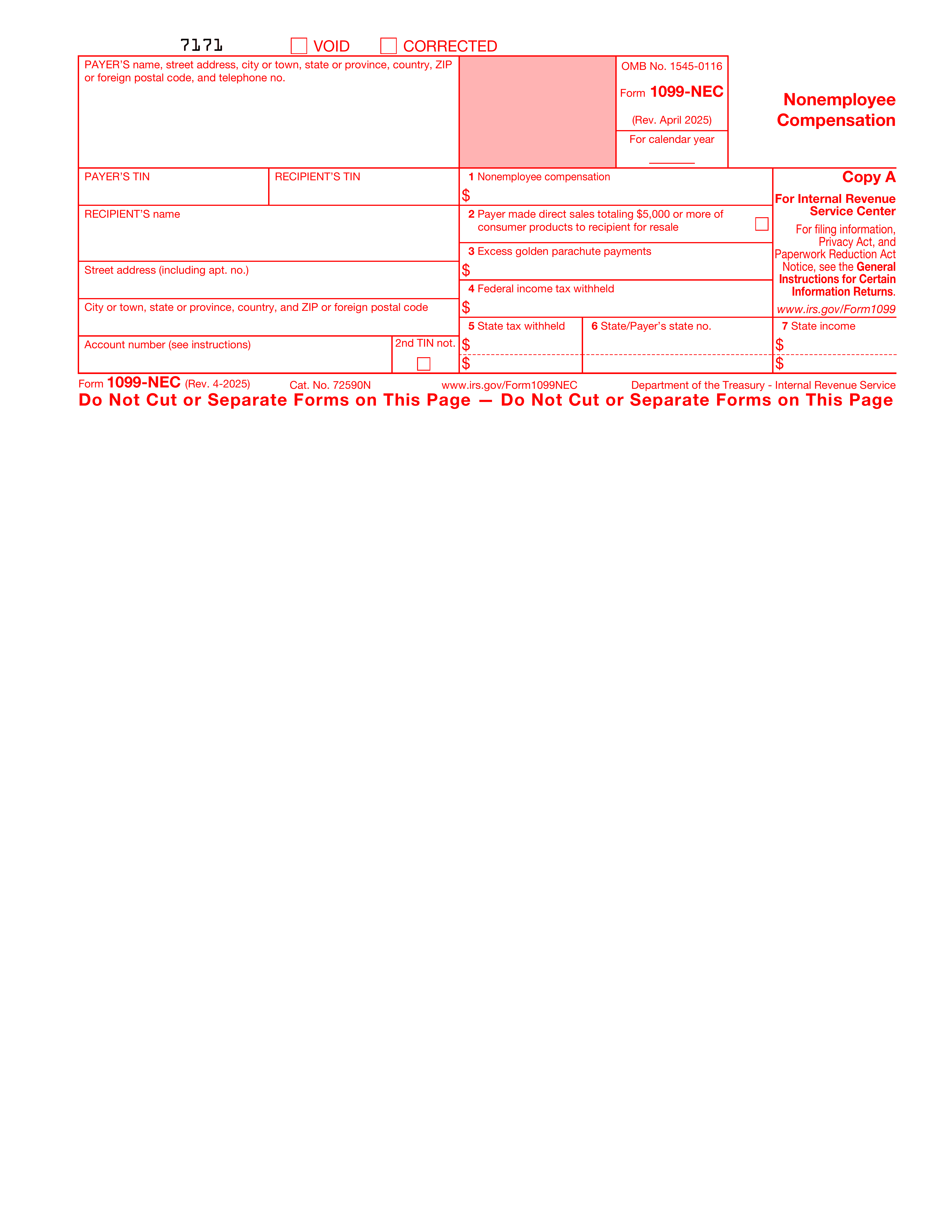
Form INFORMATIONS
Payer Info - Your Business Details:
Your business name, mailing address, and phone number. If you're a sole proprietor, use your legal name. This identifies the payer to the IRS.
Payer's TIN:
Your Employer Identification Number (EIN) or Social Security Number (SSN). This is your tax ID as the business making the payment, not the contractor's.
Recipient's TIN:
The contractor's SSN or EIN, as provided on the W-9 you received at the time of hire. Must match their IRS records exactly, or you risk triggering a B-Notice and 24% backup withholding.
Recipient's Name:
The contractor's full legal name as it appears on their W-9. Spelling errors here create mismatches when the IRS cross-references their tax return.
Recipient's Address:
The contractor's street address, city, state, and ZIP. Verify this is current before filing, especially if the contractor submitted their W-9 months ago.
Account Number:
Optional. Only required if you're filing multiple 1099-NECs for the same recipient in a single year.
Box 1 - Nonemployee Compensation:
The total amount you paid the contractor during the tax year. File a 1099-NEC if this is $600 or more. This is the number the contractor uses to report income and calculate self-employment tax.
Box 2 - Direct Sales Checkbox:
Check this if you sold $5,000 or more in consumer products to the recipient for resale. No dollar amount needed, just the checkbox. Most service-based businesses leave this blank.
Box 3 - Excess Golden Parachute Payments:
Report amounts paid above the contractor's base compensation (average of the last 5 tax years). Rare for small businesses. Previously reported on 1099-MISC.
Box 4 - Federal Income Tax Withheld:
Enter backup withholding amounts if the contractor failed to provide a valid TIN. If no tax was withheld, leave blank.
Boxes 5-7 - State Information:
Box 5 is state tax withheld, Box 6 is your state abbreviation and state ID number, and Box 7 is the state payment amount. Leave all three blank if no state tax was withheld. You can report for up to two states per form.
WHAT IS FORM 1099-NEC?
What Is Form 1099-NEC and Who Needs to File It?
IRS Form 1099-NEC, officially called "Nonemployee Compensation," is how businesses report payments made to independent contractors, freelancers, and other non-employees. If you paid someone $600 or more during the tax year for services and that person isn't on your payroll, the IRS expects a 1099-NEC.
Unlike the W-9 (which the contractor fills out and hands to you), the 1099-NEC is your responsibility as the payer. You prepare it, send Copy B to the contractor, file Copy A with the IRS, and keep Copy C for your records. The filing deadline is January 31 each year, with no extensions, and late-filing penalties range from $60 to $310 per form, depending on the filing date.
If any of the following describe you, you're on the hook for filing 1099-NECs: Small business owners who hired freelancers, consultants, or contractors during the year. Startups and agencies pay designers, developers, writers, or any other non-employee service providers. Property managers, landlords, and real estate firms make reportable payments to vendors. Accounting firms and bookkeepers filing on behalf of clients with contractor relationships. Any business that paid $600+ to an attorney for legal services, even if the attorney is incorporated.
The form appears short, with only a few fields. But between matching contractor TINs to their W-9s, calculating the correct amounts, handling backup withholding, and filing state copies on top of the federal version, it gets tedious fast, especially when you're filing for multiple contractors at once. That's where Simplicity AI comes in.
How to Fill Out Your 1099-NEC Online in 6 Simple Steps
1
Upload your 1099-NEC PDF to Simplicity AI. The AI scans the form layout, detects payer fields, recipient fields, and all 7 boxes, then converts it into a guided questionnaire.
2
Enter your business name, address, phone number, and EIN. This is the payer information that tells the IRS who made the payment.
3
Enter the contractor's details: legal name, address, and TIN. Have their W-9 handy? Upload it as a source document, and AI pulls the data in automatically.
4
Enter the total nonemployee compensation in Box 1. Add backup withholding in Box 4 and state tax details in Boxes 5-7 if applicable.
5
Review each field against the contractor's W-9 to ensure names, TINs, and amounts match. A single mismatched digit can trigger IRS notices.
6
Export your completed 1099-NEC as a clean PDF. Download Copy A for the IRS, Copy B for the contractor, and Copy 1 for your state if required.
Super Fast
Complete each 1099-NEC in under a minute. Filing for multiple contractors? Upload their W-9s as source docs and auto-fill each form back-to-back.
AI-Powered
Simplicity AI understands the 1099-NEC structure, from payer info through Box 7. It maps your answers to the right fields so you're not squinting at tiny boxes on a PDF.
Secure
Your 1099-NECs contain contractor SSNs, EINs, and payment amounts. Documents are encrypted, handled privately, and never shared. Your data stays yours.
FAQs
FORM 1099-NEC: Frequently Asked Questions
What is a 1099-NEC, and why do I need to file it?
Form 1099-NEC reports nonemployee compensation. If your business paid $600 or more to a freelancer, contractor, or any non-employee for services during the tax year, you're required to file a 1099-NEC with the IRS and send a copy to the recipient. Failing to file can result in penalties ranging from $60 to $310 per form.
How do I fill out a 1099-NEC online for free?
Upload your 1099-NEC PDF to Simplicity AI for free. The platform converts it into a guided, interactive form that walks you through each field in plain English. Enter your business details, the contractor's information, and the payment amount. Review, then export a clean PDF with all fields completed correctly.
What's the deadline for filing 1099-NEC?
January 31 of the year following payment. No extensions. This applies to both the copy you file with the IRS (Copy A) and the copy you send to the contractor (Copy B). If January 31 falls on a weekend or holiday, the deadline shifts to the next business day.
Do I need the contractor's W-9 to fill out a 1099-NEC?
Yes. The contractor's W-9 provides their legal name, address, and TIN, which go directly on the 1099-NEC. With Simplicity AI, you can upload the W-9 as a source document, and the AI automatically populates the contractor's details in the 1099-NEC.
What's the difference between a 1099-NEC and a 1099-MISC?
Form 1099-NEC is used to report nonemployee compensation (payments for services). The 1099-MISC covers other income types, such as rent, royalties, prizes, and awards. Before 2020, contractor payments were reported in Box 7 of the 1099-MISC. Now they have their own dedicated form.
Can I file 1099-NECs for multiple contractors at once?
Yes. If you're filing for 5, 20, or 50 contractors, Simplicity AI lets you auto-fill each 1099-NEC from saved data or uploaded W-9s. Same accuracy across all forms, with a fraction of the time it takes to do them manually.
Do I need to file a 1099-NEC for payments made to corporations?
Generally, no. Payments to C corporations and S corporations are exempt from 1099-NEC reporting. The two major exceptions are payments to attorneys for legal services and payments for medical/healthcare services. Both require a 1099 regardless of the recipient's corporate status.
Is my data secure when I complete 1099-NECs in Simplicity AI?
Yes. Your 1099-NECs contain contractor SSNs, EINs, and payment amounts, some of the most sensitive business data you handle. Simplicity AI encrypts your documents, never shares your files, and doesn't use your data to train AI models. You control who sees what.
Common Mistakes When Filing Form 1099-NEC
(and How AI Prevents Them)
Using the Wrong TIN for the Contractor
The number one 1099-NEC error. You enter the contractor's SSN when their W-9 shows an EIN, or vice versa. Or a digit gets transposed during manual entry. Either way, the IRS flags a TIN mismatch, sends you a B-Notice, and can impose 24% backup withholding on all future payments to that contractor. Simplicity AI lets you upload the contractor's W-9 as a source document and pulls the TIN directly, no manual retyping.
Mismatched Names Between W-9 and 1099-NEC
The recipient's name on the 1099-NEC must exactly match the name on their W-9. If the contractor wrote "James Smith" on their W-9 but you enter "Jim Smith" on the 1099-NEC, the IRS sees a mismatch. Same problem if an LLC owner's personal name was on the W-9, but you enter the business name instead. Simplicity AI auto-fills the name exactly as it appears on the source document, eliminating typos and guesswork.
Reporting the Wrong Amount in Box 1
Box 1 should include only payments for services, not reimbursements for expenses, product purchases, or credit card or third-party payments (those go on Form 1099-K instead). Overstating or understating this number creates discrepancies when the contractor files their return, which can trigger audits for both of you.
Filing a 1099-NEC When a 1099-MISC Is Required
Rent payments, royalties, prizes, and awards don't go on the 1099-NEC. They belong on the 1099-MISC. A common mistake is treating all contractor-related payments as 1099-NEC when some should be reported elsewhere. If you're unsure, the key question is simple: was the payment for services performed? If yes, 1099-NEC. If not, likely 1099-MISC.
Missing the January 31 Deadline
Unlike most other information returns, the 1099-NEC does not have an automatic extension. January 31 is a hard deadline for both the IRS copy and the contractor's copy. Penalties start at $60 per form for submissions less than 30 days late and increase to $310 per form after August 1. For a business filing 20 late 1099-NECs, that's up to $6,200 in avoidable fines. Simplicity AI cuts your filing time from hours to minutes, so deadline crunches don't turn into penalty notices.
Forgetting to File State Copies
Many states require their own copy of the 1099-NEC (Copy 1), with state tax withheld in Box 5, your state ID in Box 6, and the payment amount in Box 7. Filers often complete the federal version and forget the state requirements entirely. Simplicity AI's guided flow includes Boxes 5-7, as applicable, to ensure state filing doesn't slip through the cracks.
Not Filing Because the Contractor Is Incorporated
Most payments to corporations are exempt from 1099-NEC reporting. But two major exceptions catch people off guard: payments to attorneys for legal services and payments for medical/healthcare services. Both require a 1099-NEC regardless of corporate status. Skipping these because you assumed "they're a corporation" is a common and costly mistake.
Sending the Wrong Copy to the Wrong Recipient
The 1099-NEC has multiple copies: Copy A goes to the IRS, Copy B to the contractor, Copy 1 to the state, and Copy C stays in your records. Mixing these up, or only sending one copy when three are required, creates gaps in reporting that the IRS eventually catches. Simplicity AI exports a clean, properly labeled PDF so you know exactly which copy goes where.
Fill other related forms
Experience instant PDF form filling with AI
Developers
